Beyond deleted folders
File carving reads raw disk sectors and finds MP4 data even after formatting, corruption, or file-system damage — no functioning filesystem required.
Tesla Dashcam & Sentry Recovery · v2.20.1
ClipSalvage scans your Tesla USB drive and shows every recoverable clip — thumbnail, camera angle, and confidence score — before you pay. It recovers deleted, formatted, and corrupted footage — including Tesla’s encrypted (2026.20+) clips, which have to be carved off the drive and decrypted before they will play.*
Free: recover 3 clips + decrypt 30 encrypted · No account required
Also for Windows x64 & Arm64 — all downloads
100% on-device Notarized by Apple macOS 14+ · Windows 10/11

What You Get
Every clip shows a real thumbnail and a 0–100 confidence score, so you know what will play back before you export anything.
Clips are grouped into Sentry events by date and time — the same structure Tesla writes on the drive.
Each clip carries its camera position. When a filename didn’t survive, an on-device AI model identifies the camera and badges it distinctly.
Encrypted (2026.20+) clips preview for free, and partially-overwritten clips are rebuilt into playable video with a Repaired badge.
Capabilities
No command line, no separate media tools, and no uploading private footage to a recovery service.
File carving reads raw disk sectors and finds MP4 data even after formatting, corruption, or file-system damage — no functioning filesystem required.
Thumbnails and 0–100 confidence scores show exactly what is worth recovering — the free trial previews every clip before you pay.
Recovered clips are identified by camera position and grouped into Tesla Sentry events, ready for any dashcam viewer.
Sign in to Tesla once to fetch your clips’ keys, then decrypt, repair, and export encrypted footage fully offline.
In Depth

Tesla software 2026.20 encrypts every new Sentry and Dashcam clip on the USB drive. ClipSalvage finds those encrypted containers, fetches your decryption keys with a one-time in-app Tesla sign-in, and exports playable MP4s — fully offline from then on.
This matters most once a clip is deleted or the drive has been formatted. A decryption tool needs the file to still be listed on the drive, and a general-purpose recovery tool carves by looking for the MP4 header that marks the start of a video — which an encrypted clip does not have, because the header is encrypted along with the video. Recovering an encrypted clip takes both steps in one pass.

Clips whose data was partially overwritten on the drive are automatically rebuilt into playable video — and every clip is labelled with how much of it was recovered, so you know what you're getting before you export.

Scans only at filesystem cluster boundaries — ~131,000x fewer comparisons than byte-by-byte scanning on typical 128KB-cluster exFAT drives. A 128 GB drive scans in minutes, not hours.

Every recovered clip gets a 0-100 confidence score based on 7 integrity factors — so you know upfront which clips will play back perfectly.

Identifies all Tesla camera angles on both hardware generations: AI4/HW4 cars (2023+) record 6 — front, back, left repeater, right repeater, left pillar, and right pillar; AI3/HW3 cars (pre-2023) record 4, with no pillar cameras. When the original filename survives on the drive, it's recovered byte-for-byte. When the filename has been overwritten, an on-device AI model looks at the clip itself and identifies the camera.
Automated processing from scan to results: scanning, database prep, filename recovery, thumbnail generation, confidence scoring, saving, and completion.

Create a bit-for-bit image of your USB drive first. Scan the image, reformat the original drive, and recover at your own pace.

Select individual clips or entire events, then export in batch. Byte-for-byte copies — no re-encoding, no quality loss.
Your Data
The ClipSalvage desktop app processes everything locally. The source drive is opened read-only — nothing is ever written to it.
 All video processing happens on-device. No footage, thumbnails, or disk contents are uploaded to any server.
 The source drive is read-only. For extra safety, the built-in disk-image workflow lets you scan a copy instead of the drive itself.
 No account required for the trial. Download, scan, and preview without signing up for anything. Encrypted clips need one Tesla sign-in — through Tesla's own login window — to fetch your clips' decryption keys. The keys are stored locally, so everything afterwards runs offline.
 License activation needs a brief online check. Scanning and recovery themselves never need the internet.
Recovery Disclaimer
Data recovery is inherently uncertain. Success depends on factors outside our control: whether deleted sectors have been overwritten, physical drive health, file system corruption extent, and how the drive was used after data loss. ClipSalvage uses best-effort file carving technology and provides confidence scores to indicate expected file integrity, but cannot guarantee recovery of any specific file. We strongly recommend using the free trial to assess recoverability before purchasing a license.
Contact: info@clipsalvage.com · Qloud LTD, United Kingdom
When You Need It
For insurance claims, police reports, and hit-and-run incidents: the sooner the drive stops being written to, the more comes back.

Deleted clips from your dashcam folder that you still need.

Accidentally formatted your Tesla USB drive and lost everything.

Drive showing errors, not recognised, or clips not visible.

Need to recover footage for an incident report or legal matter.
Simple Process
Four steps from drive-plugged-in to clips-on-your-desktop. No command line, no recovery jargon.
Plug your TeslaCam USB drive straight in — or, if it's failing, unreadable or asking to be formatted, capture a byte-level disk image first and scan that copy instead. ClipSalvage only ever reads the drive, never writes to it: the deleted clips are still physically on it until Tesla records over them, so the sooner you stop using the drive, the more comes back.
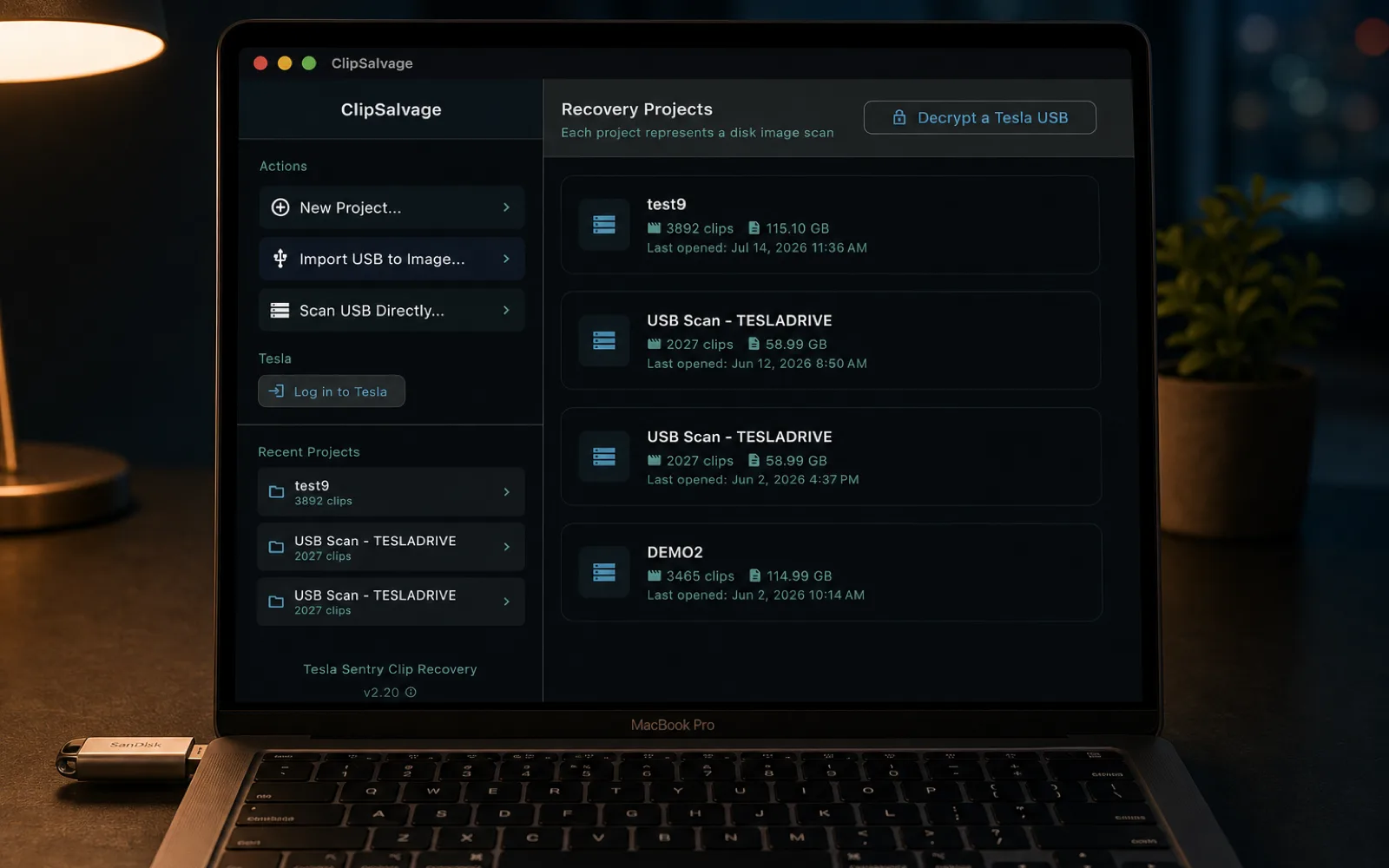
ClipSalvage reads the raw drive and carves out Tesla clips — plain MP4s and, since v2.20.0, Tesla's encrypted (2026.20+) clip containers too — so it finds footage even after the filenames are gone or the drive was reformatted, exactly when your file browser and the dashcam viewer show nothing. Clips stream in as they're found (a 128 GB drive is typically 2–5 minutes), with live progress and flat memory use no matter how large the drive.

Each recovered clip lands in a grid with a thumbnail, a 0–100 confidence score and its camera position, grouped by Sentry event. Encrypted clips are decrypted in memory for the preview — free — so you see a real thumbnail and each clip's true recoverability before paying anything. Where the original Tesla filename didn't survive, an on-device AI model works out which camera filmed it and flags it.

Pick individual clips or whole events and save them wherever you like. Plain clips come out byte-for-byte — the exact original files, no re-encoding, no quality loss. Encrypted clips are decrypted to playable MP4s — sign in to Tesla once to fetch your keys, and everything after that runs offline — while partially-overwritten clips are automatically rebuilt into playable video. It's all laid back into Tesla's own SavedClips / SentryClips / RecentClips folders, so the output drops straight into any Tesla dashcam viewer.

See it in action
Four minutes from drive-plugged-in to clips-on-your-desktop. No command line, no recovery jargon, no waiting hours for a scan to finish.
Simple Pricing
ClipSalvage is a one-time purchase — no subscription, at either tier. Decrypt ($9.99) unlocks batch decrypting and exporting of encrypted (2026.20+) Sentry and Dashcam clips; Pro ($29) adds unlimited recovery of deleted and formatted clips on top. The free trial scans your entire drive, previews every clip with recoverability scores, recovers up to 3 clips and decrypts up to 30 — so you can confirm your footage is there before paying, which is why all sales are final.
Your footage never leaves your computer
Secure payments by Stripe. Automatic tax calculation included.
EU & UK customers: The free trial lets you verify recovery before purchase. By completing your purchase you give express consent to immediate delivery of the digital content and acknowledge that you thereby lose your statutory 14-day withdrawal or cancellation right (Art. 16(m), Directive 2011/83/EU; reg. 37, Consumer Contracts Regulations 2013). All sales are final, except for rights that cannot be excluded where you live.
On encrypted clips: decryption applies to clips recorded after Tesla enables software 2026.20 USB encryption in your region. Tesla rolls this out by market, and it is not enabled everywhere — notably not in mainland China. Where it has not been enabled, your clips are ordinary MP4 files and ClipSalvage recovers them as normal; the decryption features simply do not apply. Check what your car is running if you are unsure. ClipSalvage decrypts only clips recorded by a vehicle on your own Tesla account: the keys are held by Tesla and released solely to an authenticated sign-in, so footage from someone else’s car cannot be decrypted by this or any other tool. Recovery of deleted or formatted clips also depends on the sectors not having been overwritten — a drive that kept recording may have nothing left to recover, which is why the free scan shows you what survives before you pay.
Upgrade to Pro for a one-time $19.99 and unlock unlimited recovery of deleted and formatted clips. The upgrade runs through a verified upgrade page — you confirm your purchase email and activation code, and that same code simply becomes a Pro code.
Upgrade to Pro — $19.99Licensing
One $29 payment licenses ClipSalvage permanently — no subscription, no expiry. After purchase you receive an activation code (SR-XXXX-XXXX-XXXX); enter it with your purchase email inside the app to unlock unlimited recovery and unlimited encrypted-clip decryption. The license runs on one device at a time and transfers to a new device whenever you need, and every future update is included.
Download and use ClipSalvage for free. Full scanning, preview, thumbnails, and confidence scoring available — encrypted clips included — no payment required, no time limit.
After purchasing, you receive an activation code by email (format: SR-XXXX-XXXX-XXXX). Activate inside the app:
Compatibility
ClipSalvage runs on macOS 14 (Sonoma) or later — Apple Silicon — and on 64-bit Windows 10 or 11, with a native build for both x64 (Intel/AMD) and Arm (Arm64) PCs. It needs Full Disk Access on macOS, or administrator privileges on Windows, to read the USB drive directly, plus enough free space to hold the clips you recover.
Under the Hood
Built with Flutter (UI) and Rust (core engine) connected via FFI. The Rust carving engine scans at cluster boundaries for MP4 signatures:
Data recovery is inherently uncertain. Success depends on factors outside the software's control:
We strongly recommend using the free trial to assess recoverability before purchasing a license. The confidence scoring system provides the best available estimate of file integrity, but cannot guarantee recovery of any specific file.
Knowledge base
Background reading on how Tesla actually stores dashcam footage, what really happens when you format a USB drive, and why Sentry events disappear. Written for owners trying to understand what's recoverable before they panic.
FAQ
For urgent recovery questions (insurance, hit-and-run, police reports) see the common recovery situations above.
vehicle_device_data or vehicle_cmds — the permissions Tesla's Fleet API requires to read from or send commands to a car — so it cannot unlock, drive, locate or otherwise control your vehicle. It is spent on a single request: asking Tesla to unseal the keys for the clips you selected. It expires on its own in about eight hours and is kept in your operating system's credential vault (macOS Keychain / Windows Credential Manager), encrypted by your OS — never in a plain file, never in a log. Signing out deletes it from your machine. If you'd like to verify any of this before you trust the app with a sign-in, email support@clipsalvage.com — we'll walk you through exactly what to check. You don't have to take our word for it either: run any network monitor while you recover a clip and you'll see your Tesla token go to one place — Tesla's own dashcam endpoint — and nowhere else.Get Help